Batman Fixing The Batcomputer With A Toolbox Coloring Page

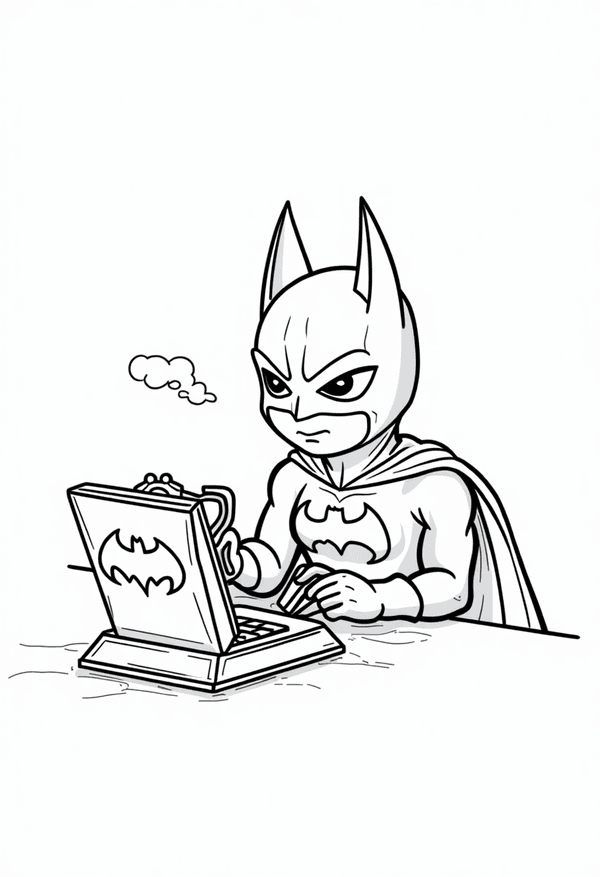
Color Batman as he repairs the Batcomputer with his trusty toolbox. Perfect for fans who love tech and superhero adventures!

easy
Large shapes and minimal detail make this ideal for younger kids.
RobotsCharactersFunny

Create Your Own Batman Coloring Pages With AI

Need some inspiration? Try these:

Batman fixing the Batcomputer with a toolbox coloring page

Printable Batman Coloring Page Featuring the Batcomputer Repair Scene

Ready for a hands-on superhero adventure? Download and print this free Batman Fixing The Batcomputer With A Toolbox coloring page for instant fun! Batman sits focused at his desk, fixing the Batcomputer with steady hands and his trusty toolbox by his side. Large shapes make it perfect for younger kids who love superheroes, tech, and coloring.

Brighten up Batman’s world right from your own home and show off your unique version of this classic scene. It’s a perfect pick for parties, school projects, or creative quiet time!

Get started and join Batman as he saves the day, one repair at a time!

Download Free Coloring Page
Choose your preferred format and start coloring!

✅ Free to download, print, and color

✅ High-quality resolution for best results

✅ Personal, non-commercial use (see our terms for details)

Share This Coloring Page
Page Details
Coloring Category:

Batman

Coloring Level:

easy

Added on:

2026-01-02

How to Use
  1. 1Click any download button above
  2. 2Save the file to your device
  3. 3Print on regular paper or cardstock
  4. 4Start coloring with your favorite tools!
Accessibility Guide

Painting a Picture with Words

For our visually impaired colorists and friends, here’s a description of the Batman Fixing The Batcomputer With A Toolbox scene to help bring the coloring page to life.

Batman is sitting at a desk, focused as he works on a small bat-shaped computer. His expression is serious, and he's using a tool from a nearby toolbox to fix something on the device. A small puff of smoke rises from the computer, hinting at a malfunction. Batman's cape flows behind him, and the iconic Bat-symbol is visible on both his chest and the computer screen. The overall background is simple, with no extra scenery or characters.

Get Creative With Our AI Coloring Page Generator!

Original photo of kid playing with cat
Generated coloring page of kid playing with cat
✨ One-click conversion

Photo to Coloring Pages Tool

Turn your images into coloring pages

Generate Now
AI generated coloring page of dog sunbathing in garden
✨ Dog sunbathing in garden

Text to Coloring Pages Tool

4 difficulty levels for children to adults

Generate Now

About the Batman Fixing The Batcomputer With A Toolbox Coloring Sheet

In this easy Batman coloring sheet, you’ll find Gotham’s hero deep in thought, hard at work on his famous Batcomputer. He’s seated at a simple desk, using a special tool from his toolbox to fix a techy problem as a puff of smoke drifts up, hinting at a Batcave malfunction. Batman’s iconic suit and flowing cape stand out, with the Bat-symbol on his chest and computer screen shining bright.

The background is left simple so your colors can take center stage. This joyful coloring page is a great way for kids to channel their love for heroes, gadgets, and creative storytelling!

Add your own details to bring Batman’s Batcave repair mission to life.

Creative Coloring Tips for Batman and His Batcomputer

Make Batman pop by using bold blacks and royal blue for his suit and cape. Try coloring the Bat-symbol bright yellow for extra impact. The Batcomputer can glow with cool blue, green, or even neon touches to show high-tech magic. Color puffs of smoke with light grays or silver for a dramatic effect, and shade the toolbox with steel gray, classic red, or even Batman’s favorite black.

Let your imagination run wild—maybe give him a custom-colored tool or add a sticker to the toolbox. You get to design this gadget-filled adventure however you want!

Why Kids Love Coloring Batman’s Tech Adventures

Kids love this Batman coloring page because it highlights the Caped Crusader’s techy side and clever mind! It’s exciting to see Batman solving a mystery or fixing gadgets, not just battling bad guys. Coloring helps bring out Batman’s problem-solving skills and attention to detail, inspiring young fans to think creatively and act bravely in their own adventures.

This page offers heroes in a new light, making it fun for fans who enjoy both superheroes and technology. It’s a perfect mix of action, teamwork, and cool gadgets!

Challenging Areas in Batman and Batcomputer Coloring Page

This coloring page is rated easy, but look out for a few unique spots! Batman’s Bat-symbol and the computer screen are small and might take careful coloring. The puff of smoke has swirling lines that are fun to shade smoothly. Batman’s fingers holding the tool may be a little tricky, but using a sharp pencil or thin marker helps.

The best tip? Start with bigger spaces like Batman’s cape and work toward the little details at the end for a neat and heroic finish.

Benefits of Coloring Batman Fixing the Batcomputer

Coloring this Batman Batcomputer repair scene does more than pass the time. It improves hand strength, sharpens focus, and builds creative confidence as you finish each area. This activity encourages storytelling as kids imagine what Batman is fixing or inventing next!

Plus, coloring is a relaxing way to unwind after school—a fun escape into Gotham’s underground world. Every completed page brings a sense of accomplishment and pride in your superhero skills.

8 Cool Batman and Batcomputer Facts to Inspire Your Art

Before you color, check out these cool Batman and Batcomputer facts to inspire your masterpiece:

  1. The Batcomputer is Batman’s main hub for solving crimes and tracking villains in the Batcave.
  2. Utility Belt tools help Batman fix almost anything, including high-tech computers.
  3. The Bat-symbol has been updated over the years—try creating your own version!
  4. Puff of Smoke means a real Bat-problem—maybe the Joker hacked the system!
  5. Toolbox gadgets can include screwdrivers, bat-shaped wrenches, and secret devices—give them colorful handles!
  6. No Superpowers: Batman relies on brilliance, teamwork, and quick repairs to save the day.
  7. Batcomputer Screens often glow green, blue, or neon—great for fun coloring!
  8. Cape Colors range from black to midnight blue—experiment with highlights and shading.